
Advanced Grade Calculator
Easy Grade Calculator
Average Grade Calculator
Final Grade Calculator
Grade Percentage to Letter Grade Chart
| Percentage | Grade |
|---|---|
| 90% – 100% | A+ |
| 80% – 89% | A |
| 70% – 79% | B |
| 60% – 69% | C |
| 50% – 59% | D |
| Below 50% | F |
EasyGradeCalculator – Fast & Free Grade Calculator Tool
Looking for a simple way to calculate grades online? Welcome to Easeconverter’s EasyGradeCalculator — the easiest grading calculator you’ll ever use. Whether you’re a teacher grading tests, a student checking your results, or a parent tracking progress, this free online grader gives accurate results in seconds.
No confusing formulas or manual calculations. Just enter your score, and we’ll do the rest!
What Is EasyGradeCalculator?
EasyGradeCalculator is a powerful grade calculator and EZ grader that instantly converts your test results into a percentage grade, and can show letter grades like A, B, C, D based on standard cut-offs. It’s designed to work smoothly on phones, tablets, and desktops — no downloads or signup required
To understand percentages, consider this example: if you score 18 out of 20 on a test, you answered 18 questions correctly. To find your percentage, divide the number of correct answers (18) by the total number of questions (20), then multiply by 100.
(18 ÷ 20) × 100 = 90%
Explore similar questions
(19/20)×100=95%
(18/20)×100=90%
(17/20)×100=85%
(16/20)×100=80%
(15/20)×100=75%
(14/20)×100=70%
How EasyGrade Calculator Work?
This grading calculator works in three simple steps:
Enter the total number of questions in your quiz or exam. 🙋♂️
Enter how many questions were answered incorrectly (or how many you got right).
The result is calculated immediately — showing your percentage and grade!
For example:
👉 If you scored 12/14 grade → the tool calculates the percentage for you.
👉 If you scored 16/20 grade → you instantly see how well you did.
The formula behind it is the same one teachers use but automated for convenience:
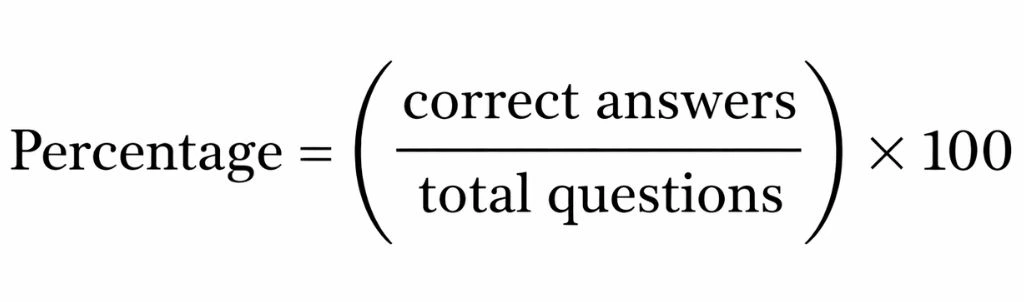
That means you get fast, precise results — no calculator needed!
Why Use This Grading Calculator?
✅ Instant results with no manual math
Enter the numbers and watch your score update automatically.
✅ Percentage conversion made easy
From simple scores like (18/20)×100 to custom inputs, it works instantly.
✅ Letter grades & plus/minus support
Get A, B, C, or even A+ and B- depending on your chosen scale.
✅ Custom grading chart
Teachers can set their own cut-offs — perfect for different schools or exam systems.
Real-World Examples
Here’s how EasyGradeCalculator helps you instantly:
Calculate score when you get 12 out of 14 correct and see the percentage and grade automatically.
Convert a 16/20 grade into a percentage and map it to A, B, C or other letter grades.
Teachers can bookmark the page and reuse it for every class — no signup needed!
FAQs❓
1. What is an EasyGradeCalculator?
An EasyGradeCalculator is a free online grade calculator that helps you quickly calculate percentage scores and letter grades. Instead of manually solving formulas like (18/20)×100, you simply enter the correct answers and total questions, and the grading calculator instantly shows your result.
2. How does the grade calculator work?
The grade calculator uses a simple formula:
Percentage = (Correct Answers ÷ Total Questions) × 100
For example, if you score 16/20 grade, the tool converts it into 80% automatically. It saves time and eliminates calculation mistakes.
3. Can I calculate grades using number of wrong answers?
Yes. Most EZ grader tools allow you to enter the number of questions and the number wrong. The system automatically calculates your score and converts it into percentage and letter grades.
4. How do I calculate 12/14 grade?
To calculate 12/14 grade manually:
12 ÷ 14 = 0.857
0.857 × 100 = 85.7%
But instead of doing this manually, you can use the easy grader to instantly convert it to percentage and see the corresponding letter grade.
5. How do I calculate 16/20 grade?
A 16/20 grade equals:
16 ÷ 20 = 0.8
0.8 × 100 = 80%
Using a grading calculator, you’ll see the percentage and grade classification immediately without manual calculation.
6. Does the grading calculator support letter grades?
Yes. Our ezgrader supports letter grades like A, B, C, D based on standard A B C D cut-offs. Some versions also support plus/minus grading (A-, B+, etc.) for more precise results.
7. Is this grade calculator free to use?
Absolutely. This is a free online grader designed for students, teachers, and parents. It works directly in your browser and does not require registration or downloads.
8. Who can use this grading tool?
This grading tool for teachers is perfect for:
Teachers grading tests and quizzes
Students calculating exam scores
Parents checking homework results
Whether you need a quick test grader, quiz grader, or simple percentage calculator, this tool makes grading fast and easy.